Skip to content

You’ve done everything you were supposed to do. You’ve built a solid WooCommerce store, boosted your traffic, and convinced shoppers that your products offer value.
Unfortunately, it doesn’t pay off, and no one is purchasing or following up.
A WooCommerce abandoned cart is a seriously costly issue for online store owners to face, and it’s a surprisingly persistent one as well.
Industry benchmarks put the average abandonment rate at 70.22%. In other words, 7 out of 10 shoppers who manage to reach the cart page never complete the checkout.
For most WooCommerce store owners, that’s a stunning amount of lost revenue every day.
Most of the abandoned carts aren’t shoppers changing their minds about wanting your product.
Instead, it’s the result of significant obstacles in the checkout experience that pushes customers away before they seal the deal.
If you remove those obstacles, you’ll recover lost sales you had no idea you were missing.
In this post, we’re sharing nine practical tweaks our team has used to help clients tackle WooCommerce abandoned cart problems, from streamlining checkout forms to building automated WooCommerce abandoned cart recovery sequences that bring shoppers back.
Why WooCommerce Checkout Often Causes Abandonment
Before diving into the specifics, it’s worth understanding why WooCommerce abandoned cart rates tend to pile up in the first place. In our experience auditing client stores, the same culprits pop up again and again.
Overly Long Checkout Forms
Nothing destroys the desire to make a purchase like a long, drawn-out process. Asking for too much information simply destroys momentum.
Shoppers don’t want to fill out lengthy forms just to buy something. They’ll find another venue, even if it takes longer to find another option than it would have to go through your tedious process.
Surprise Shipping and Tax Costs
We live in the age of Amazon Prime, where two-day free shipping is almost as automatic as eating and breathing. Surprising shipping and tax costs will trigger an exodus in a heartbeat.
Just envision seeing a total cost that makes your entire day, and right before you hit the purchase button, an entirely different cost pops up that threatens to dig a lot deeper into your bank account.
Lack of Trust Signals
If shoppers feel uncertain about payment security, especially first-time buyers, they’re much more likely to bail before they enter their customer details. There were over 10,500 Magecart attacks in 2025, and that’s just one small slice of the payment fraud pie.
Many potential consumers are understandably skittish when it comes to giving away personal and payment information.
Poor UX on Mobile
A clunky mobile experience is a huge turn-off. Mobile traffic makes up 70% of all e-commerce traffic, so this is the worst possible group to offend with a poor mobile site design.
Slow Page Load Times
This plays off the “poor UX on Mobile” theme as well, but slow load times can also apply to the desktop experience as well. Regardless of the platform, every second of load time pushes cart abandonment rates higher. Shoppers have a ton of options, and very little patience.
These problems are very real and a driving force behind poor sales and lackluster traffic. These patterns consistently show up when we dig into abandoned cart tracking data and abandoned orders for clients across industries. Each tweak below targets one or more of these issues directly.

Tweak #1: Simplify the Checkout Form
The goal is to remove all friction from the very beginning. If your checkout page asks for info that isn’t strictly necessary (second phone number, a fax number, a company name on a B2C transaction, etc.), you’re creating small but irritating reasons for shoppers to second-guess the process.
Every unnecessary field is an extra board or two added to the exit ramp. Fortunately, there are several ways to tighten things up and right the ship.
Minimize Form Fields to the Essentials Only
Name, email, shipping address, and payment information are almost always enough. Audit your form and cut away everything that goes beyond those four things.
There’s typically not a reason to ask a B2C customer for more information, especially if it requires them to give away more personal information.
Enable Guest Checkout By Default
You may miss out on some marketing opportunities, but if the goal is to get consumers to purchase your products, don’t make them sign up and create an account beforehand. Allow them to make purchases as guest users and invite them after their orders are confirmed.
Capture an Email Address Early
The goal is to get the email address request early in a minimized form. That way, if the customer pulls a cart abandonment early, the opportunity to send abandoned cart reminders remains.
Combine Steps Where Possible
Billing and shipping information can easily fit on the same screen, so don’t separate them. Even if the process is just as fast as a single form, it “feels” like it takes longer to fill out shipping info on a different form.
In short, the less the customer has to fill out, the better. Capturing that email address early is one of the simplest ways to improve your abandoned cart recovery rate, while a shorter, streamlined process will effectively reduce abandoned carts.
Tweak #2: Transparent Pricing and Shipping
Unexpected costs at checkout are one of the single biggest cart abandonment triggers in e-commerce. Shoppers get excited, and it builds as they add items and move through the checkout flow.
That final price tag that completely overshadows what the customer originally assumed is a deal breaker more often than not. They’ll leave, and the likelihood they’ll return is slim and none.
Show Shipping and Tax Costs Before the Checkout Page
A shipping estimator on the cart page lets shoppers know exactly what to expect before they make the final commitment and hit the “purchase now” button.
Use Dynamic Cost Calculators
Let customers enter their zip codes early and get a real-time shipping estimate, rather than discovering the additional cost at the final step of the checkout page.
Add Free Shipping Thresholds
A message like “You’re $5 away from free shipping” is a surprising motivator. Customers are always on the lookout for a deal, and it’s a great method for reducing abandoned carts and increasing average order value at the same time.
Use Discount Codes and Promotions Strategically
A well-timed coupon code, whether it’s delivered through an exit-intent pop-up or included in recovery emails, can bring hesitant buyers back to complete checkout after they’ve already left.
There’s no escaping the fact that transparency builds trust. When customers know exactly what they’re paying for prior to commitment, they’re more likely to follow through.

Tweak #3: Speed Up Checkout Pages
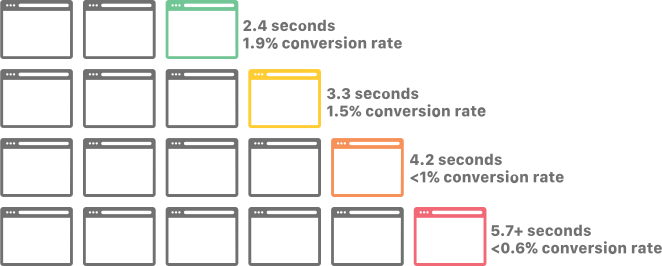
Checkout speed isn’t a technical concern only. Research consistently shows that even a two-second delay in page load time can increase cart abandonment rates. On mobile platforms, that rate is even more pronounced.
Use Caching, a CDN, and Optimized Hosting
These three fundamentals alone can drastically improve load times on your checkout page and cart page.
Eliminate Unnecessary Scripts and Plugins
Your WooCommerce plugin stack may be loading assets on every page, including checkout, that have no meaningful purpose there. Thoughtful plugin management means auditing which plugins fire off during checkout and restricting the ones that shouldn’t.
Prioritize Fast Mobile Performance
A checkout that loads quickly on desktop but drags on mobile is a serious issue. Test it out on real devices, not just desktop emulators that offer a mobile view.
Poor cart recovery performance usually begins with a slow-loading checkout experience. Speed is where many WooCommerce abandoned cart issues stem from.
Tweak #4: Build Trust and Credibility
Buyer anxiety starts to creep in right before entering payment information. Shoppers are making a split-second judgment call, at this point, about whether or not your site is safe and legitimate.
If you haven’t given them strong visual signals that it is, you’ll lose them.
Add SSL and Security Badges Near Payment Fields
Visible confirmation that your checkout process is encrypted helps reduce hesitation, right at the most sensitive part of the entire process.
Display Accepted Payment Logos
Recognized card and wallet icons go a long way with consumers (VISA, Mastercard, PayPal, Apple Pay). They signify legitimacy, even for first-time shoppers.
Add Short Trust Reinforcement Copy
Use simple phrases, such as “secure checkout” or “your payment information is never stored.” Messages like these bolster the confidence of consumers that your site, and more importantly, their payment information, are secure.
Show Reviews or Rating Near Checkout
Social proof can include more than the product page. A quick reminder of your site’s reputation can tip the scales in your favor.
When buyers have a stronger degree of confidence, they convert. When they feel uncertain, they leave, and it’s really that simple. Reducing that uncertainty at the checkout stage is one of the best things you can do to recover lost sales.
Tweak #5: Provide Multiple Payment and Checkout Options
Offering only one, perhaps two payment methods, is a significant conversion killer. Shoppers expect flexibility, and they fully expect to see their preferred payment methods listed.
If it’s not there, they aren’t going to apply for a new payment method, like Apple Pay, PayPal, or Payoneer, and then come back.
Support Major Payment Gateways
Credit and debit cards are obvious givens. However, you should also integrate popular payment systems, such as PayPal, Apple Pay, Google Pay, and buy-now-pay-later options such as Klarna or Afterpay.
Offer Express Checkout Where Possible
One-click or wallet-based checkout for returning customers or mobile shoppers significantly reduces abandoned carts for people who are ready to purchase but don’t want to type out all of their details again.
Make Payment Selection Intuitive
Don’t bury payment options behind a bunch of steps or in areas difficult to find on the checkout page. Shoppers should be able to see and select their method quickly.
More payment gateways mean fewer reasons to walk away, and this is especially important for higher ticket purchases, where BNPL options can boost conversions by lowering the perceived upfront commitment.
Tweak #6: Build a Strong Cart Recovery System
Even with every single on-site fix in place, some shoppers will still leave without buying. That’s completely normal and nothing to worry about. What separates high-performing WooCommerce stores from average ones is what happens “after” the abandoned carts.
Set up Automated Abandoned Cart Reminder Emails
Well-timed abandoned cart reminders can bring customers back while their purchase intent is still warm. The first email should go out within an hour of abandonment.
Schedule Multiple Reminder Emails
Sequences should hit at 1 hour, 24 hours, and 48 hours. Send abandoned cart reminders with different messages at each stage, beginning with urgency, then social proof, then an incentive.
Use Email Templates That Match Your Brand Voice
Generic recovery messages won’t cut it. Custom email templates that reflect your tone perform much better and feel more helpful.
Add Optional Incentives
A coupon code or free shipping offer in the second or third email can convert hesitant shoppers who need that one final little push. Where possible, auto-apply discount codes so there’s no friction in redeeming the offer.
Sync Email and SMS for Better Reach
Timely reminders via SMS can improve your recovery rate of abandoned carts for mobile shoppers, especially those who don’t open their emails very often.
Always make sure your chosen abandoned carts plugin handles customer details responsibly and in compliance with applicable privacy standards.

Tweak #7: Exit-Intent Offers and On-Site Prompts
Sometimes, shoppers don’t need a follow-up email. All they need is a reason to stay. Exit-intent pop-ups are one of the more effective tools in your arsenal, preventing last-minute abandonment before it happens.
Deploy Exit-Intent Popups with a Compelling Offer
When a user’s cursor moves towards the closing tab, trigger smart, exit-intent popups with a discount code, limited time offer, or a free shipping reminder.
Add Persistent Cart Reminders or Progress Indicators
A simple checkout progress bar shows shoppers exactly how close they are to finishing, and fewer unknowns equal a lower number of abandoned carts.
Use On-Site Messaging to Address Common Objections
A well-placed return policy reminder, delivery estimate, or security note near the checkout button helps resolve last-second hesitations without sending shoppers elsewhere to find answers.
Exit-intent pop-ups are a low-cost, high-impact addition to a WooCommerce cart abandonment recovery strategy. They work best when paired with a strong abandoned cart recovery email sequence behind them.
Tweak #8: Keep Product Info Accessible During Checkout
One underestimated driver of abandoned carts is shoppers navigating away from the checkout page in the middle of the process to double-check a product detail.
Unfortunately, they don’t come back. Keeping cart details visible throughout the flow helps solve this problem.
Allow a Quick-View of Cart Contents
A collapsible or persistent order summary showing only the items in the cart, including names, quantities, and prices, keeps everything nice and visible, without cluttering the checkout form.
Include Thumbnails and Basic Product Details on the Checkout Page
Seeing the product during checkout reinforces the buying decision and reduces mid-process second-guessing and potential abandonment.
Make Cart Details Easily Editable
If a shopper wants to adjust the quantity or remove an item, they should be able to do so without leaving the checkout page entirely.
It’s the little UX details that often get overlooked the most, but they all play a vital role in keeping buyers focused on finishing their purchases without bouncing back to browse or check other online stores.
Tweak #9: Improve the Mobile Checkout Experience
Mobile commerce represents a massive and growing share of online purchases, and abandoned carts on mobile platforms run at higher rates than they do on desktops.
If your checkout page isn’t built for mobile, your daily lost sales are large and predictable.
Use Mobile-Friendly Design and Large, Tappable Buttons
Tiny form fields and cramped CTAs are a checkout nightmare on small screens, and one of the fastest ways to drive up abandoned carts on mobile.
Streamline Fields and Enable Autofill Support
Entering full addresses on mobile can be frustrating. Using address auto-fill or location APIs helps speed up the process and reduces the effort required from users. This is particularly helpful for mobile shoppers, where typing tends to be slower.
Add Sticky CTAs That Remain Visible While Scrolling
A persistent “Place Order” or “Continue to Payment” button makes it easier for shoppers to continue to the next stop without more scrolling and searching.
Test Your Checkout On Devices Regularly
What looks great on a desktop preview might behave the opposite on a smartphone or tablet. Catching issues before your customers do is part of a healthy recovery strategy.
What you want (and what customers definitely want) is a fast, frictionless checkout. It’s a baseline expectation for any competitive WooCommerce store.

Other Common Mistakes to Avoid
Even well-intentioned store owners can undercut their own abandoned cart recovery efforts without realizing it. Fortunately, there are some common mistakes to watch out for, so take note.
- Using too many plugins without testing their overall impact
- Ignoring mobile users
- Skipping checkout performance testing
- Not tracking results via analytics
- Sending recovery messages that feel robotic
Getting these basics right won’t just help you reduce abandoned carts, but also makes the other tweaks work harder. A well-optimized checkout, backed by a smart WooCommerce cart recovery strategy, is one of the highest ROI investments WooCommerce store owners can make.
Stop Losing Sales You’ve Already Earned
WooCommerce abandoned cart problems rarely come from shoppers who are losing interest in your products. They come from the friction of your online store, like slow pages, surprise costs, clunky mobile experiences, and a lack of follow-up when buyers drift away.
The nine tweaks covered in this post are the kinds of changes that transform a WooCommerce store into a reliable revenue machine. When they’re all combined and working together, the results compound, necessary attempts to recover abandoned carts diminish, and lost sales start coming back.
Let’s Start Recovering Your Abandoned Carts
Our team has helped store owners across industries identify checkout friction, build WooCommerce abandoned cart recovery systems that convert, and optimize every step of the buying experience for speed, trust, and mobile performance.
Whether you need a quick checkout audit, a complete WooCommerce abandoned cart recovery overhaul, or ongoing store optimization, CoSpark will cover everything from strategy to implementation. Contact us today, and let’s start turning your abandoned carts into completed orders.
FAQs
What is cart abandonment in WooCommerce?
Cart abandonment in WooCommerce happens when a shopper adds items to their cart and starts the checkout process, but leaves the site before completing the purchase.
Why do customers abandon carts at checkout?
The most common reasons include unexpected shipping or tax costs, overly long checkout forms, a lack of trust signals near payment fields, slow checkout page load times, and limited payment options.
How fast should a checkout page load?
Normally, your checkout page should load in under three seconds. Beyond that, cart abandonment rates climb fast. On mobile, even a one or two-second delay can cost you a sale.
What’s the ideal number of checkout fields?
As few as possible while still capturing everything you need to fulfill the order. For most stores, that means name, email address, shipping address, and payment information. Every additional field increases the likelihood of abandonment.
Do abandoned cart emails work?
Yes, abandoned cart emails are one of the highest-converting tools available to store owners. Well-timed reminder emails at 1 hour, 24 hours, and 48 hours can recover a solid percentage of abandoned carts that would normally become lost sales.